More than ever these days I'm living in
the cloud.
Google has my mail,
Apple has my calendar,
del.icio.us has
my bookmarks,
Flickr has
my photographs, and
Amazon S3 has my files.
Day-to-day I rely on a lot of cloud infrastructure, and while I'm old enough to remember having to wade though
card catalogues, and still know five fun things to do with
microfiche, I no longer go to the library when I need a journal article. NASA's
ADS and Cornell's
pre-print archive provide instant semantically tagged access to both the historic and latest literature. I haven't physically set foot in a library in several years now.
I've moved away from my old arrangement, where I had a desktop machine in the office, and then a laptop for traveling. My main machine is now one of the new 13-inch Aluminium
Macbooks, when I'm in the office I hook this up to one of
Apple's new
LED displays; off of which hangs several 500GB disks for backup and scratch space, a
full sized keyboard, and a
mouse. So whether I'm on a plane, a train, or siting in my office, everything is just the same. The screen gets a bit bigger or smaller, and my desktop background changes, but that's about it.
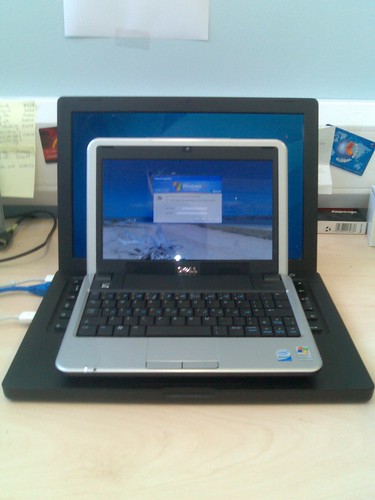
That said when I'm travelling long haul, rather than lugging my Macbook around, I've even started to leave that behind. I'm using my
Dell mini 9 netbook as a thin client to the cloud and, at least for short trips, this seems to be going fairly well.
I'm on tender-hooks to see whether Apple is going to venture into the netbook territory, after all, I've been
waiting for a replacement for my old 12-inch Powerbook for a long time now. However if an officially sanctioned Apple netbook doesn't show up in the next few months I might get round to
installing OSX on my mini9. Then again, I might not. It's surprising how tolerable Windows XP turns out to be, at least if all you're using it as is a platform to run
Google Chrome and some web applications.
But there is a
dark side of the cloud, it isn't always there, and here I'm not talking about the offline problem. After all, that what
Gears is there to fix...
Recently I had my AdSense account
shut down. Totally ignoring the loss in future revenue, Google also locked me away from my data. The information about what ads sold, on which page, when. I'm paranoid about backups, and expect other people to be too, but that isn't data I had elsewhere. While I could have exported it, I didn't. Mainly because it would be fairly hard to analyse outside of Google's own infrastructure.
Google also hosts my email and my blog, and its
RSS feed now that they've acquired
Feedburner. Which puts them locking me away from my own data in a very different light. Blogger
doesn't have an export function, and it's not alone. With Yahoo in trouble I've started to worry about all the
pictures I have hosted on
Flickr. They also don't have any way to back up your content.
To be clear, I'm not just talking about the raw content. Especially in the case of Flickr the meta-data attached to the content; the date, time, geo-location and associated tags are as equally important as the content itself. If you can't export the content with the meta-data attached, it's hardly worth doing. Even worse, there are services where taking your own data out of the context of the service makes it worthless. Exporting my data
from Twitter, taking it out of the Twitter timeline, is fairly pointless.
Which of course brings me to the well trodden path of data portability. My calendar, address book and email are all portable because they are in standard formats. I can easily migrate between services, and some of those services even encourage me to do so...
Other content is not as portable, and that is of course because there aren't any standards to make it portable. How would you go about writing the export service for Flickr, or Blogger? Especially one that made sure it exported all the meta-data in a decently digestible format. Who would implement code to read from the format. Could the network even support thousands of users making a run on Flickr, for instance, and grabbing all their archived pictures?
This is a problem we're all going to face as our lives, and the data trail we generate, move into the cloud. Because that's our data I'm talking about. It doesn't belong to the companies that host it. They may be providing the services that display it, but the data is ours. They really need to remember that...