Showing posts with label Laptop. Show all posts

Tuesday, November 18, 2008

The Tablet PC Trial

I've had a tablet PC on loan from the Open University for the last six months or so and, as it's getting shipped back to them tomorrow, I thought I'd bounce a few ideas around about how I got on with it...

CREDIT: TabletPCReview.com
The Toshiba Tecra M7

The OU lent me a Toshiba Tecra M7, which is about two years behind the cutting edge, and had fairly lackluster reviews even back then. However I know at least one person who, despite the relatively poor uptake of tablet PCs in general, swears by theirs and wouldn't have a normal laptop, so I was really interested to get my hands on one for an extended test.

However even after six months with the Toshiba, using it for all my OU teaching support and marking, I'm not a convert. In practice I found the tablet an ergonomic nightmare to use. While in the end I worked out a method of propping the tablet and my elbows up to different levels using stacks of books, so that I could use it for several hours at a stretch to mark scripts, it was hardly an elegant solution. Using the tablet on its own for any length of time severely exacerbated my RSI, making it almost entirely un-portable.

I don't really want to get into issues specific tablet model I was testing, for instance placing the power jack directly under where you'd normally want to put your elbow was an act of twisted genius, but suffice to say there were many.

However I can see why the OU lent it to me, in theory being able to write comments, draw freehand diagrams, and scribble equations onto student work allows a much more flexible approach to marking work submitted electronically by the students. In practice the tablet only partially lives up to what, in theory, it should be easily capable of...

It really didn't help that the software integration of the tablet into the OS is also pretty poor. Writing large chunks of text you intend to be read by the OCR software is a laborious process, and spinning the display around so I could use the keyboard to do so wasn't really practical, or particularly convenient. I'll draw a polite veil over the possible comments I could make about painstakingly spelling out words on the software keyboard.

Ergonomically therefore, the tablet PC was a total bust. I'd almost go as far as saying it was unusable. It was certainly almost entirely un-portable, it also counts as one of the heaviest laptops I've ever had the misfortune to have to carry around. If you've followed the blog for any length of time, you'll know that I subscribe to the notion that there are two main core demographics for laptop users. The road warriors, who would kill for another half hour of battery, or half a kilogram less of laptop, and the power users who desperately want another couple of inches of screen real estate, and another hundred gigabytes of hard drive.

I definitely fall into the road warrior category, the tablet PC I had on trial weighed three or four times as much as the Dell mini I recently picked up to use while traveling.

So it's not exactly with a heavy heart that I'm saying goodbye to my loaned PC. I can see the problem the tablet PC is trying to solve, but at least for me, it doesn't even come close to living up to the hype.

Friday, November 14, 2008

The non-arrival of the (next) Dell mini 9

So after buying one of Dell's new netbooks, the Inspiron mini 9, for myself as a travel laptop and living with it for a month or so, my wife was sufficiently impressed with it to order one herself.

She placed the order on the 16th of October with an expected delivery date of the 31st of October. A couple of days before it was due to arrive her expected delivery date was put back until the 17th of November. Today, a couple of days before it was due to arrive, she received another revised delivery date of the 26th of November. That's a full month lead time now, and two slips in the shipping date.

She isn't happy, and since the reason she was getting a new laptop in the first place was an incident involving a dog, a baby, a low table, a full cup of milky tea and her previous Dell laptop you can probably figure out why. Her unhappiness hasn't really helped by the fact that my original mini 9 was delivered over a week early...

This has started me wondering why the shipping dates for Dell's "off the shelf" mini 9's are slipping, and whether this has anything to do with their deal with Vodafone. Are UK destined netbooks having to be diverted to fulfill Dell's obligation to its partner? Is Vodafone putting pressure on Dell to slow down shipments of stock netbooks to encourage sales of their own WWAN-enabled version? You have to wonder...

Update (17/Nov): Well you have to be reasonably impressed by that. Having spotted my complaint on the blog someone, somewhere, did something. One phone call and an email later, the laptop shipped. We all know things go wrong, and delays happen. But if you point out a problem, and the problem gets fixed, that's good customer service.

Update (19/Nov): The laptop has now been delivered.

Sunday, October 26, 2008

Living with the Dell mini 9 and Apple's iDisk

This is another quick note about living with Dell's new netbook...

CREDIT: Dell

I'm storing most of my files off-board in the Cloud using Jungle Disk and Amazon S3. But since it's been around longer and I've got a bunch of files on it, at least for now, I also needed to mount my Apple iDisk. While there is the iDisk Utility for Windows XP from Apple it grates that you have to use a seperate bit of software for something like this. Fortunately you don't actually need it...

Like a lot of seemingly proprietary bits and pieces from Apple, the iDisk isn't, it's basically just a simple WebDAV share, and Windows has built-in support for that. All you need to do to connect to your iDisk is go to My Computer and click on Tools > Map Network Drive and enter \\idisk.mac.com\username in the pop-up and select an unused drive letter. Enter the username and password when asked. Your iDisk should now show up as a network disk in Windows Explorer.

Friday, October 17, 2008

Living with the Dell mini 9 and ISO images

Just over a month ago I picked up a one of Dell's new netbooks...

CREDIT: Dell

I rarely use the DVD drive on my Macbook, and generally there is only one reason that I need to fire it up, that's to install commercial software. Which is exactly what I need to do with the mini today.

However rather than go out and buy an external USB DVD drive I decided to work around the mini's lack of internal DVD by using my Macbook to create an ISO image, transfer the ISO onto a USB memory stick, and then mount it directly on my mini 9.

Inserting the CD into my Macbook I opened up a Terminal window and unmounted the disk from the command line,

$ diskutil unmountDisk /dev/disk1

Then I created an ISO file with the dd utility, you'll either need to do this,

$ dd if=/dev/disk1 of=image.iso bs=2048

or this,

$ dd if=/dev/disk1s0 of=image.iso bs=2048

depending. You can test the ISO image by mounting the new file using the command line,

$ hdid image.iso

or simply by double clicking on it in the Finder. If all is well, copy the ISO image onto a USB memory stick and plug it into your netbook.

If your mini is running Linux, you've now got everything you need. Login as root and create a directory to use for your mount point, and then mount the image on the mount point as follows

# mkdir /mnt/iso
# mount -t iso9660 image.iso /mnt/iso/ -o loop

On the other hand if your mini is running Windows XP like mine, there isn't anything pre-installed that will let you mount an ISO image. Fortunately however there is an unsupported, and more or less unadvertised, freeware utility from Microsoft that lets you do just that, the "Virtual CD-ROM Control Panel for Windows XP" allows you map an ISO image and make it look just like a normal drive to the operating system.

At which point you should be able to install your software as normal and even, for those bits of software that demand the original disk in the (non-existant) drive, run it as if a disk were present by leaving the ISO image mounted as a mapped drive. Although, depending on how picky your particular bit of software's thrice-cursed DRM turns out to be, your mileage may vary on that one...

Monday, October 06, 2008

The Mini 9 from Vodafone

So as I've mentioned before Dell's new netbook, the Inspiron mini 9, is going to be available for free with an 18 month mobile broadband contract on Vodafone here in the UK.

The launch date is the 13th of October, but the netbooks have already started to arrive at Vodafone's offices in Newbury. Disappointingly it looks like the rumours were correct, and I won't be able to just install a WWAN card in the off-the-shelf mini 9 which I picked up a couple of weeks ago.

Netbooks causing a stir at the Vodafone offices...
Posted to Flickr by jonmulholland.

Perhaps I should grab another from Vodafone, and then install Mac OSX on my current mini 9?

The mini 9 running OSX
CREDIT: UNEASYsilence

Tempting, but I'd really like to see how integrated the WWAN is into Windows before signing up for an 18 month contract. Or, thinking about it, whether anyone can get Vodafone's card to work under OSX if it comes to that. One of the things that seriously put me off the HSDPA USB dongle I had on loan from 3 was the hassle involved in actually using it...

Update: Dean Bubley has a cost analysis of Vodafone's offer, comparing it against an off-the-shelf mini direct from Dell with a 3G dongle. To cut a long story short it's more expensive, which at least to me, isn't exactly unexpected. You're paying, or at least being charged, for the extra convenience of having things built-in rather than having to carry around extra "stuff". Essentially you're paying an early-adopter premium.

I must admit I'm still very disappointed that I was unable to specify a vanilla 3G module when I bought my mini 9 directly from Dell. To be honest I wouldn't even mind having to post-purchase a WWAN card from Dell's co-marketing partner, in this case Vodafone, and slot it into my mini myself. However if the off-the-shelf mini's really are lacking the internal antenna infrastructure needed to support the card, that's probably a non-starter. Oh well...

Thursday, September 11, 2008

First impressions of the Dell mini 9

Quite unexpectedly on Thursday morning, over a week before my predicted ship date, my new Dell Inspiron mini 9 arrived. I wasn't alone of course, it seems that they were arriving on doorsteps everywhere, and after playing with it over the weekend I thought I'd post my first impressions of Dell's new netbook.

Posted on Flickr by aallan.
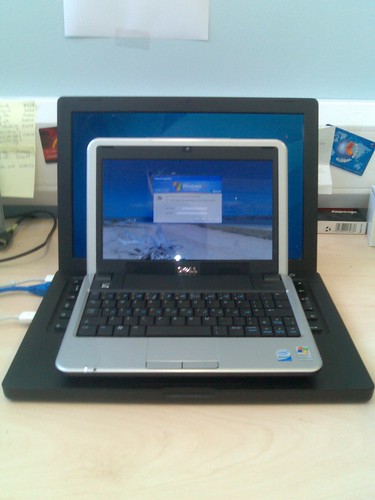
The mini 9 with my 13-inch Macbook for comparison

It's hard to convey how small this thing is, none of the pictures I've taken so far show that, it just looks laptop sized, although the above with the mini perched on top of my Macbook comes close...

Ergonomically then, things are a bit of challenge. I'm still getting used to the keyboard, and I'm unsure whether I'll ever be able to touch type properly on it, and here the somewhat eccentric placement of some of the keys doesn't help. However, it's useable. The same can be said of the processor, I've found the mini somewhat sluggish, although that could be my frustration with Windows shining through. However, again, it's usable...

More than useable in fact, I'm impressed. The screen is just big enough, at least for me, the keyboard isn't really all that bad. It's fast enough and it hardly weighs anything. The power brick isn't huge and, so far at least, the battery seems to last the predicted three and a half hours.

My current plan is to try and use the netbook as it one is intended to be used, and fortunately Dell hasn't loaded XP down with the traditional bloatware. I've installed Google's new Chrome browser and generated desktop icons for Google Mail and Google Reader. I've installed Jungle Disk to access my Amazon S3 buckets, and as much as possible I intend to live in the cloud.

We'll see how that goes...

Thursday, September 04, 2008

The Mini 9 with built-in HSDPA?

Hot on the heels of the official release of Dell's new netbook, the Inspiron mini 9, is the news that Dell has shaken hands with Vodafone on a co-marketing deal.


However the rumour is that, unlike similar deals, the Dell netbook will ship (at least here in the UK) with built-in HSDPA broadband. Which will certainly set the cat amoungt the pigeons...


If true, and initial reviews of the netbook certainly suggest that there could be more than a grain of truth here, this is exciting stuff.

Update: Okay, that's official. Although there isn't any news as to cost as yet, Vodafone would be mad not to significantly subsidise the already fairly moderate cost of the mini 9. Free with a contract data plan sounds like a decent price point to me...

Now I have to decide whether I should pick one up now, or wait? If I buy now, can I get an HSDPA board for it later, or will I be stuck without WWAN access? Decisions, decisions...

Update: The Vodafone press release...

Update: If true, the news that the stock version of the mini 9 "...doesn't have the internal antenna infrastructure needed to support mobile broadband", isn't good...

The Dell Inspiron Mini 9

The much rumoured and long awaited Dell Insipron mini 9 was released officially today, both in the US and in the UK. Although from the looks of things the US rollout isn't going that smoothly, with XML errors and unreachable web pages that are appearing and disappearing at random...


The bad news is that while there are three models in the US, priced at US$349, US$399 and US$449, only the top end model has seen the light of day here on the other side of the pond, priced at £299. The UK version is also only shipping with Windows XP, there isn't an option for an Ubuntu installation, as there is in the US...

However, taking the exchange rate into account, and the fact that the US prices aren't quoted with sales tax included, the UK price is actually (for once) fairly comparable with the US price for the same hardware. Well done Dell. But unfortunately there is more bad news...


There isn't any sign of the red version of the new notebook, either here or in the US. While in the US you can have the mini 9 in either white or black, shades of the Apple Macbook there? On the UK side of the pond you can have any colour you like, so long as it's black. Unfortunately for Dell, the red version was the reason I wanted one in the first place, it's certainly the reason my wife wants (wanted?) one.

The good news? Apparently additional colours and a version shipping with Ubuntu are "coming soon"...

Update: Also coming soon is a version of the mini 9 shipping with built-in HSDPA broadband from Vodafone...

Wednesday, January 02, 2008

The crazy Apple rumour mill

The run up to Macworld in January is always crazy, but this year seems especially bad. I've been waiting for a replacement for the 12-inch Powerbook for a long time now, but the recent rumours of a sub-notebook seem to be almost believable in view of other developments like the amazing success of the Asus Eee PC, and of course, the iPhone.


Now we have pictures, or rather a picture, probably the first in a long line of fake images purporting to show the rumoured sub-notebook. But fake or not, it has yet again wet my appetite for a proper replacement to my faithful 12-inch Powerbook. So I'm already looking at my hardware budget in a new light, thinking about how to squeeze a new sub-notebook in there, despite the Blackbook I bought in October. Apple, you've got at least one customer waiting...

Update: We got our a sub-notebook, but not this one...

Monday, November 19, 2007

More Apple sub-notebook rumours?

I've been waiting for a replacement for the 12-inch Powerbook, and something "much cooler" than the current Macbook Pro for two years now. It hasn't happened yet, and I've repeatedly asked "What about the 12-inch?"...

Yet despite that rumours of a subnotebook persist ahead of Macworld in January next year. You know what, they're probably accurate. Why? Because last month I finally gave in and bought a Blackbook.

Update: More rumours ahead of Macworld.