Thursday, May 31, 2007

The Mountain View Webcast

After a short break I'm back in the same seat for the final session of the day, which is a live webcast directly from Google's campus in Mountain View.


The opening keynote from Mountain View

As the developer day in London draws to a close the one in Moutain View is just kicking off and, along with everyone else here in London, I'm currently listening to the opening keynote from California. Funnily enough they're saying many of the same things, in the same way, as we heard this morning during our own opening keynote. Consiering how much fun some of the rest of the day has been, this seems to be a bit of an anticlimactic end to the day.

Update: Okay here we go, we've got some product announcements. The first announcement is Google Mashup Editor, which apparently does what it says on the tin and lets you build simple mashups with a few clicks.

Update: Next up they're talking about Mapplets which we heard about earlier. I'm guessing I was in the wrong parallel session to hear about the Google Mashup Editor perhaps?

Update: I actually think our own keynote was a lot better than the Mountain View keynote, which seems to be very heavily scripted and with the talking heads obviously not being that used to public speaking. This certainly isn't a Steve-note like performance from Google. But maybe there will be one more thing?

Update: Now covering the Google Web Toolkit and now Google Gears which we've also already heard about and the new offline version of Google Reader.

Update: They've just rolled on the CTO of Adobe to talk about Google Gears and Apollo. I haven't seen a demo of Apollo before, and I'm actually quite impressed especially with Gears integration it looks interesting to manage easy cross-platform development.

Update: Okay, we're wrapping up at the end of the keynote. It doesn't look like there is one more thing, alhtough they have just rolled Sergey Brin onto the stage.

Update: No, Sergey didn't really say anything interesting, and we're done...

Developing for the Mobile

So I've actually had to get off my seat and move through to one of the other theatres for my next session, which is Developing for the Mobile with Gummi Hafsteinsson.

Looks like my back-up battery might be enough to see me through the rest of the day, but it's going to be close. I still can't believe there aren't any power sockets here?


Gummi Hafsteinsson talking about mobile websites

Gummi has started off talking about the difference between the standards on the mobile web and the "desktop" web. His claim that there was only two main browsers on the desktop, IE and Firefox, didn't go down that well. You could see people with Apple's on their lap whincing as he said it...

He went on to talk about the complexity involved in the mobile market, the large number of browsers that tend to render things differently, and the huge number of handsets with different capabilities. But the thing we're supposed to take away from the talk is that we should, "Ignore the complexity and try and keep it simple".

However a good rule of thumb is that since most of the mobile browsers are XHTML not HTML, if your markup isn't standards compliant then it probably won't be rendered at all. Unlike the "desktop" web its unlikely that sloppy markup will work. This also means that you need to specify you character encoding specifically because the browser probably won't guess correctly.

Another interesting point he's trying to hammer home here is that the way people use the mobile web is very different than the "desktop" web. People generally don't type URLs into a mobile browser, so if your site isn't indexed by a search engine (or is well known and has a short URL) then people probably won't use it.

You also need to take account of the small amount of processing power available on the client side, you really need to sclae the images on the server rather than client side and have a maximum image width of 120 pixels by default.

The other thing to focus on is what people are actually going to use your mobile site for, after all you probably don't want to do the same things from your phone than you do from your desktop.

Next he's really insistant that you do your testing on actual handsets because the emulators don't reflect what really happens when you put the site onto real hardware. However you shouldn't be tempted to exploit the capabilities of the new advanced phones without good reason. Don't do optimisation unless it gets you real functionality for your predicted user base. If you are pushing financial data and your users mostly (all?) have a Blackberry then it makes sense to optimise for that handset, but otherwise it's probably not worthwhile.

In summary, you have to develop your site with a good idea of why your doing it and why your users might want to use your site on the move. Finally, keep things simple, and only do customisation if it's really needed.

Update: The session has been posted to YouTube...

Building better AJAX apps (Google Gears)

I'm still sitting in the same seat for my next session, looks like my choices were fairly popular as this is the largest of the theatres, which was originally titled "Building better AJAX applications/Newest APIs" which was the obsufcation used to disguise today's launch of Google Gears. So I'm now sitting in a tutorial called "Google Gears: An Open Source Offline Toolkit" given by Chris Prince the Gears Engineer.


Chris Prince talking about the new Google Gears

Needless to say, there still aren't any power sockets in here and I've just had to dig the spare battery out of my rucksack...

Gears is basically somewhere in between a full blown web application, and a fully offline native application, but is intended as an incremental approach to supporting offline in web applications implemented as a browser plugin for IE, Firefox and Safari (well, almost)... he says its going to "Do for offline what XMLHttpRequest did for web apps".


The Google Gears architecture with its sync server

Basically the applications write to the local database instead of the remote server, and when you go online the changes are written (or read) from the remote server. Basically its analogous to a browser cache, except that the local "cache" is actually the primiary reference rather than the fall-back.

We're getting down to nuts and bolts right now, with bits of code starting to appear, so I'm going to stop typing now and listen...

Update: ...okay, so Gears look really interesting. I can't help thinking that Gears combined Google Apps equals the long rumoured Google office suite. It answers the main problem with web applications and your data. That being, what happens if you don't have a web connection? Not being able to get to your data isn't really acceptable. I've got a feeling that this is Google's call to arms, and a shot across the bow of Microsoft Office, and it's going to be interesting to see what happens here. Basically people are sitting around here with their jaws hanging open... "You can do that!?".

Update: The session has been posted to YouTube...

Google Earth and the GeoWeb

I'm in the same room for my second session, which is Google Earth, KML and the GeoWeb given by Peter Birch. Who has just promised us to go light on PowerPoint and heavy on the KML and text editors.


Peter Birch talking about Google Earth

He's talking about how to use Google Earth and time domain data to tell stories which is an interesting perspective on how people view data visualisation and from my hard science perspective wasn't really something that had occured to me...

Update: Like the previous speaker he's heavily pushing using KML to store your geo-data so it can be indexed and searched, and can you blame him? It also looks like he's doing what he promised and really gettting down and dirty with the XML, so I'm going to stop typing and listen to what he's saying...

Update: ...okay, I'm back. That was a really good walk thourgh of the features available in KML. He's closing out with some new features in KML 2.2, including photo overlays which is something I've been wanting to do for a while now...


The new photo overlay feature

Update: The session has been posted to YouTube...

New features in the Maps API

Managed to sneak a couple of row forward from where I was in the keynote, but there still aren't any power sockets in here...


Andrew Eland talking about the Google Maps

My first real session of the day Andrew Eland talking about the new features in the Maps API. He started off giving a brought overview of the API, but did finally dig down into showing us some real code, starting off with the classic Hello World program in Maps by dropping a marker onto the map as an overlay that when clicked on displays the classic message.

I'm going to stop typing now and listen to what he's got to say...

Update: Apparently coming soon is AdSense for Google Maps which means you'll be able ot monterise your Maps mashups pretty trivially, interensting...
<script>
var manager = new GAdsManager(map, "id" );
manager.serMaxAdsShow(3);
manager.enable();
</script>
Update: He's talking about Mapplets which blends the Google Gadgets and Maps API, which produces a Google Maps API application turned into a plug-in for Google Maps. He's going through the "Hello World" example as a mapplet now, doesn't look too bad, and explaining how the Mapplets are protected against cross-site scripting attacks.

Update: He's trying to sell us on not locking away your geo-data inside your own Javascript code but instead use a KML file which will be indexed by Google and allows the data to be used by other people.
<script>
var kml = GGeoXml( "url" );
kml.addMapOverlay( );
</script>
Another benefit is that it's a lot easier to add the data as an overlay as Google will handle virtually everything for you. Looks to be a classic case of separation of data and implementation. An easy sell?

Update: The session has been posted to YouTube...

The Google Keynote

The kick-off keynote is in two parts, with Chris DiBona giving the first keynote on open source idealisim and the APIs and then Ed Parsons who'll be talking about the Geoweb.


Waiting for the keynote to start...
 

Chris DiBona talking about open source and APIs

Chris kicked off talking about their sitemaps protocol for web crawling, which they've released under the Creative Commons license, and about how this approach is being extended to the rest of their APIs. He's arguing that "What's good for the web is good for Google" and how bogus it is to create your own license, and how releasing APIs is the obvious thing to do...

He's going on to talk about Google Gears, which is a new too which can be used to make web apps able to work offline, which they're releasing into the big bad world today. Looks like they've snuck it into the Newest APIs session because they were all being secretive and stuff, so I get to have a close look.

Chris has handed over to Ed Parsons, fresh in from Where 2.0, who is talking about geography, maps and building the Geoweb.


Ed Parsons talking about the Geoweb

Ed has just said "Everything that happens, happens somewhere", which is something I hear from my other half all the time. I've definitely got déjà vu here...

Ed went on to talk about the amount of geographical information and how only a small fraction of it has been indexed yet, and the huge amount of niche long-tail geo-data that is sitting around waiting for people to pick up make accessible. After his overview, he returned to the core product Google Maps and how the functionality of the application is exposed for us to use. He brought us all the way up to date and talked about street view which was only released yesterday at Where 2.0. No open API yet, but it's coming soon. He's also talking about the new Google Mapplets application.

From there he went on to talk about Google Earth as a platform, and how the database is open and extensible, and how you can use KML to create and expose content.

We're about to break for lunch, I've got pictures, but pushing that much data up to Flickr isn't going to happen with the wireless network in its current state. I'll upload them when the network improves.

Update: The session has been posted to YouTube...

Google Developer Day 2007

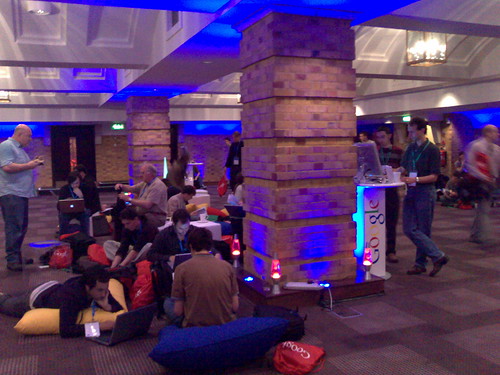
I'm currently squatting on one of the large pillows strewn Blogger Lounge at the Google Developer Day in London.

The Blogger Lounge
The Blogger Lounge

For those of you who didn't manage to talk their boss into letting them blow an entire day to go to this thing, you'll have to make do with the talks that are being streamed to the web. I've managed to get into the New features in the Maps API, Google Earth and the GeoWeb, Building better AJAX apps/Newest APIs and Developing for the Mobile sessions. I'll try and keep blogging as the day goes on, but the wireless internet is starting to creak under the pressure already, and I've got a feeling I'm going to have to fight for a power socket.

The important bit of these sorts of days is, of course, the free stuff. So far I've snagged a 500MB flash drive, a yo-yo, some silly putty, a Google mouse mat and of course a Google T-shirt. You can't complain...

Update: The Google Keynote given by Chris DiBona and Ed Parsons.

Update: The new features in the Maps API session with Andrew Eland.

Update: The Google Earth and the GeoWeb session with Peter Birch.

Update: The Google Gears session with Chris Prince.

Update: The mobile development session with Gummi Hafsteinsson.

Update: The webcast keynote, live from Mountain View.

Update: Footage from the Google Developer Day is now on YouTube.

Tuesday, May 29, 2007

Google streetside view from Where 2.0

News from the O'Reilly Where 2.0 conference of the upcoming release of the much predicted Google street side view (via O'Reilly Radar).


The new Google street side view layer in Google Maps

Of course this isn't new, after all Amazon A9 did this back in 2005, but neither was online mapping applications when Google Maps launched. The question isn't whether they're were first, it's whether their interface is so much better than what's gone before (yet again) that they corner the market. That, and from the sounds of things, whether this gets integrated into Google Earth.

However while the guys over at O'Reilly seem to be able to see this on the Google Maps pages right now, it looks like the rest of us will have to wait for the official announcement during Where 2.0 later today. I certainly can't see the new features and from the comments on their post it doesn't look like I'm alone on that one.

Update: I can confirm that adding &gl=us (via Lifehacker) to the URL does indeed allow you to use the new features, at least from the UK, and from what I remember it blows the interface for the long defunct A9 service out of the water. The way you can click and drag around your location is actually pretty slick.

Update: The guys over at the Google Lat Long blog have pointed us to a video showing how to use the new features.

Monday, May 28, 2007

Web 2.0 and scientific method

It looks like people are puzzled as to why scientists aren't keen on Web 2.0 technologies. Being an physicist by training, even if not entirely by profession these days, at least to me, it's really obvious. The scientific process isn't about the wisdom of crowds. Just because everyone thinks something is true, it doesn't mean it is true...

While peer review has been compared to the wisdom of crowds, it isn't the same thing at all. Under the peer review model all people are not created equal, and expert knowledge of the subject area is both necessary and respected by the process. An obvious counter analogy in the Web 2.0 world is Wikipedia, which seems to lack the traditionally respect for expertise, and has suffered a large amount of criticism as a result.

Science has been built off the back of the peer review process, and anything which threatens to undermine that has to be looked at very, very, carefully. Not because change is necessarily bad, as scientists we're open to change, willing (hopefully) to throw away long treasured theories if the evidence proves that we've been wrong (or at least not right). But right now, there doesn't seem to be a lot of evidence that the wisdom of crowds will work out better than peer review.

For instance several times I've had to explain tagging to my colleagues because of its relevance to the ADS archive or arXiv pre-print server, and been met with exclamations of horror. Instead of promoting interesting research people are afraid that the wisdom of crowds will flatten it, because something is "obviously wrong" valid research will get trampled down before it sees the light of day. Currently the way to bury someones research is to duplicate their experiment and prove them wrong, when it simply becomes a matter of a number of influential people tagging a paper as being dubious, so nobody bothers to read it again, then you have to start to worry.

Mobile banking? Not quite yet...

I do some of my banking with the Alliance and Leicester, so I was interested to learn that they're on the bleeding edge having just introduced a mobile banking service.

So I decided to sign up and see whether this is disruptive technology or whether this is yet another dead end like mobile TV , and that's when the trouble started.

There isn't a link to the new service from the bank's home page, so I did the obvious thing and ran a Google search. The top hit looked solid, so I clicked though and went to register. Well the first problem is that the link went off site to monilink.co.uk and then when I pushed ahead anyway I got an "Invalid Security Certificate". Now I happen to know that their new service is hosted by MONILINK, but to your average user this isn't going to be very reassuring. Considering how good some of the phishing scams are these days I wouldn't blame anyone for stopping at this point...

So backing up I logged into the bank's Internet Banking site and, sure enough, there is a link which lets you sign-up to the service. So I tried...

Unfortunately the Flash demo, of how the sign-up process is supposed to work, didn't play in either Safari or Firefox despite both theoretically being Flash-enabled, so I had to push ahead without it.

However it seems that, so long as you're already logged into the Internet Banking service, a list of accounts you can link to the new service just appears auto-magically. You type your mobile number in and you get a text message with, bizarrely, a link to a WAP site where you can retrieve a code to authenticate your phone for the service. Despite some misgivings at this point I did that, got my text message, went to the WAP site and retrieved the code.

Then I typed it into the browser I had open on the Internet Banking site, and got an "An error has occured, please start the registration process again" error. So I did, twice, and never got another text message back from the service. Which means that, despite fiddling around for about quarter of an hour, I didn't manage to register.

So while I'd like to provide a review of Alliance and Leicester's new mobile banking service, I can't, and I'm left with an abiding impression that MONILINK don't have things working smoothly enough so I'd trust my money to this technology quite yet. I'll get back to you if I can ever get it to work, so much for disruptive technology...

Update: ...and for the record, I don't think that this,

The security of MONILINK is at the heart of our service. The world-leading technology used by MONILINK has been developed in conjunction with some of the foremost banking security companies in the world. The solution has passed repeated, independent audits from leading, independent security experts.
which is all the MONILINK site has to say about security, is really sufficient to reassure anyone with even a basic knowledge of cryptography. These days, security through obscurity isn't going to save you from the bad guys.

Update: I decided to be stubborn about this, while re-registering on the Alliance and Leicester site several more times didn't result in any additional text messages, I decided to bypass their site by going directly to the MONILINK site and registering there. Guess what? They think I'm already registered. Well done Alliance and Leicester, no wonder I wasn't getting any additional registration text messages. However crucially at this point I don't have have a copy of the MONILINK application since the Alliance and Leicester registration bailed before I got to that stage. What I do have is a short code number to text to allow me to download the application, but that doesn't seem to be working. Want to guess whether most people would have given up by now?

Update: I've been thinking about this a fair bit today. Why have they gone for a separate application? For older phones I guess I can see the point, but I've got a Nokia N80. Why not just cut down their banking site using appropriate CSS and push well formatted Javascript and HTML at me in the normal way? Why does my bank need to use these MONILINK people at all? Especially since the entire thing seems to run via (expensive) text messaging, at 20 pence per balance enquiry I'm not that impressed. What's wrong with, you know, the Internet? The entire thing seems to be yesterday's solution to tomorrow's problem. So despite never getting this to work I'm going to arbitrarily declare the entire technology dead on arrival, just like mobile TV.

Sunday, May 20, 2007

The age of the picocell?